Announcing Collate 1.12


We are pleased to introduce Collate 1.12, the newest version of our managed OpenMetadata service, featuring the latest innovations in AI-powered semantic intelligence. Highlights from this release include:
-
Collate AI Studio - Create and customize AI agents for metadata management across your entire data platform
-
Collate AI SDK - Embed Collate's metadata and semantic intelligence into any application or workflow
-
Custom Auto Classification - Create AI-powered recognizers for any data type, with feedback loops
-
Data Quality Test Library - Define reusable, parameterized test templates for organization-wide consistency
-
Data Diff Column/Row Analysis - Pinpoint exactly what changed between source and target with character-level precision.
Our mission continues for making high-quality metadata management accessible to every data team—through AI-powered automation, open standards, and a platform that meets teams where they work.
Collate AI Studio
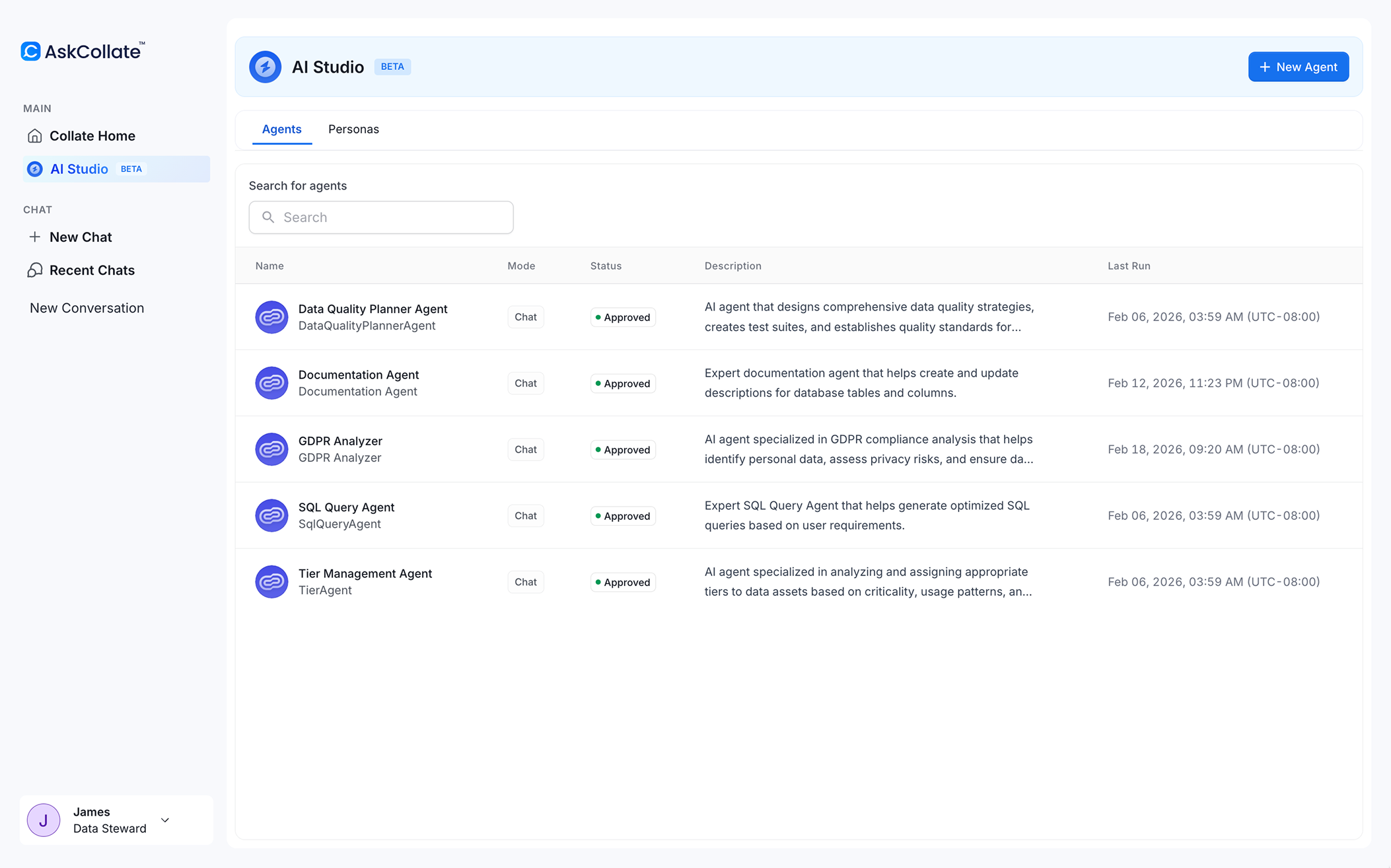
Collate AI Studio lets you customize existing AI agents and create new ones to manage your data landscape. Adapt how Collate's native agents behave, or create purpose-built agents that understand your organization’s unique knowledge graph—all through an intuitive interface that lets you adapt agents to your team’s specific needs. To learn more, read the Collate AI Studio launch blog.
-
Customize native agents: Tailor Collate's native agents for documentation generation, data quality analysis, and tier assignment to match your organization's standards. Modify agent prompts to fit your requirements—for example, instruct the documentation agent to "prepare all descriptions in Spanish" or adjust the data quality agent to follow your organization's specific testing conventions. If customizations degrade performance, restore original behavior with a single click.
-
Create custom AI agents: Build new agents with access to Collate's semantic metadata graph, giving them deep context about your data landscape. Define each agent's persona, abilities, and behaviors from a single configuration interface.
-
Interact and integrate: Engage with your custom agents directly, then integrate them into your workflows using the AI SDK. All agent activities are recorded in Collate's audit logs for full visibility.
Why this matters: Generic AI responses waste time and don't scale across large teams. AI Studio lets you encode organizational knowledge into agents, ensuring consistent, accurate results that align with your established practices—whether you're adapting existing automations or building entirely new ones.
Collate AI SDK
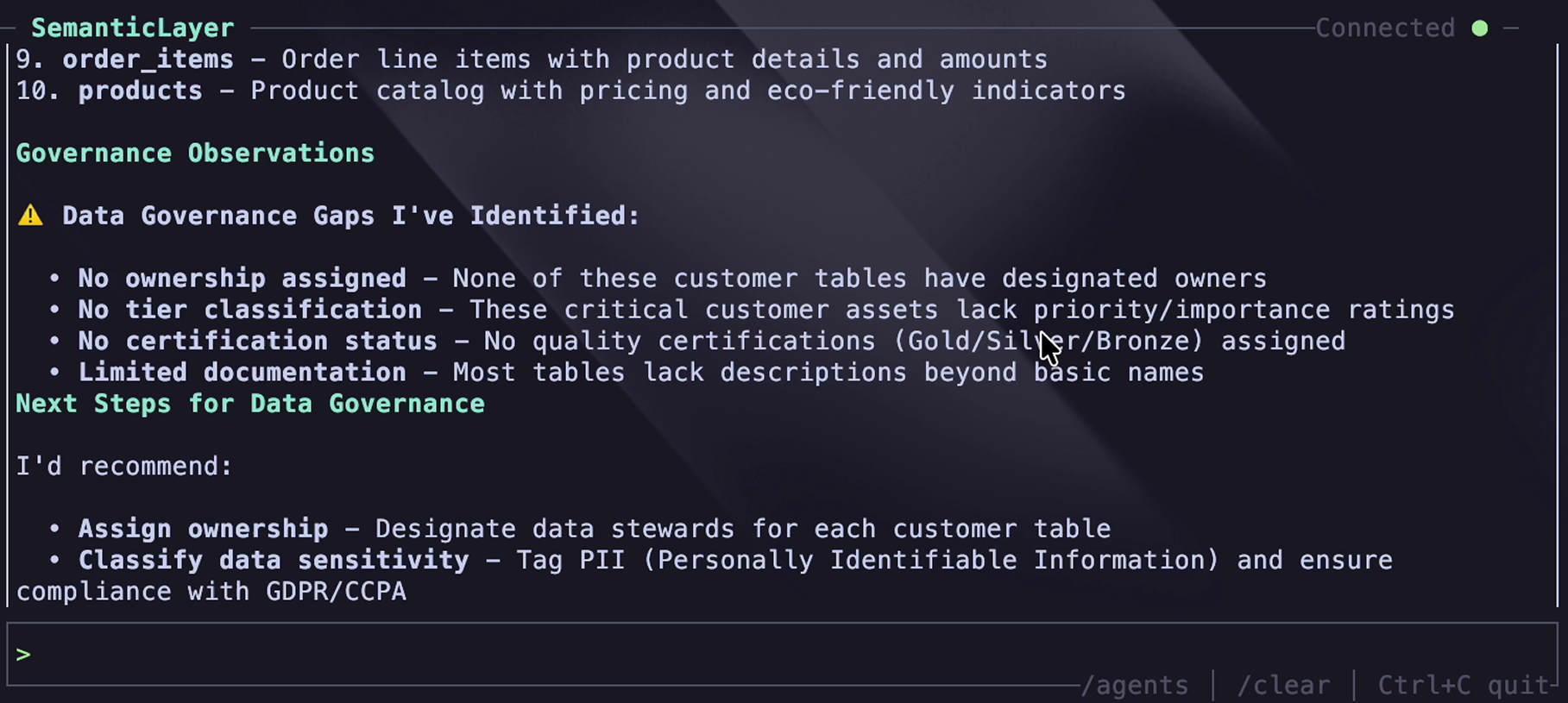
The Collate AI SDK provides programmatic access to Collate's AI agents and semantic layer, enabling you to embed metadata intelligence into any application or workflow. Build custom chatbots or agentic automation, and integrate Collate's semantic understanding into tools like Slack, GitHub, n8n workflows, or any custom application.
-
Build on Collate's Semantic Metadata Graph: Access lineage, quality metrics, ownership, and business meaning through a simple API, eliminating the need to reconstruct this complex knowledge graph yourself.
-
Agent-powered applications: Create bespoke agents in AI Studio, then invoke them from external applications using the SDK. Empower your users with custom-built applications that inherit the semantic intelligence you've created in Collate.
-
Intelligence for workflows: Embed Collate Agents in your platform, bringing Collate Semantic Intelligence into your existing AI systems and applications.
-
CLI and programmatic access: Interact through command-line tools or integrate directly into Java, Python, or TypeScript applications.
Why this matters: Manually integrating semantic intelligence with multiple systems creates fragmented experiences and duplicated effort. The SDK lets you embed Collate’s semantic intelligence wherever your teams work, bringing Collate to where work happens instead of forcing users to come to you.
Custom Auto Classification
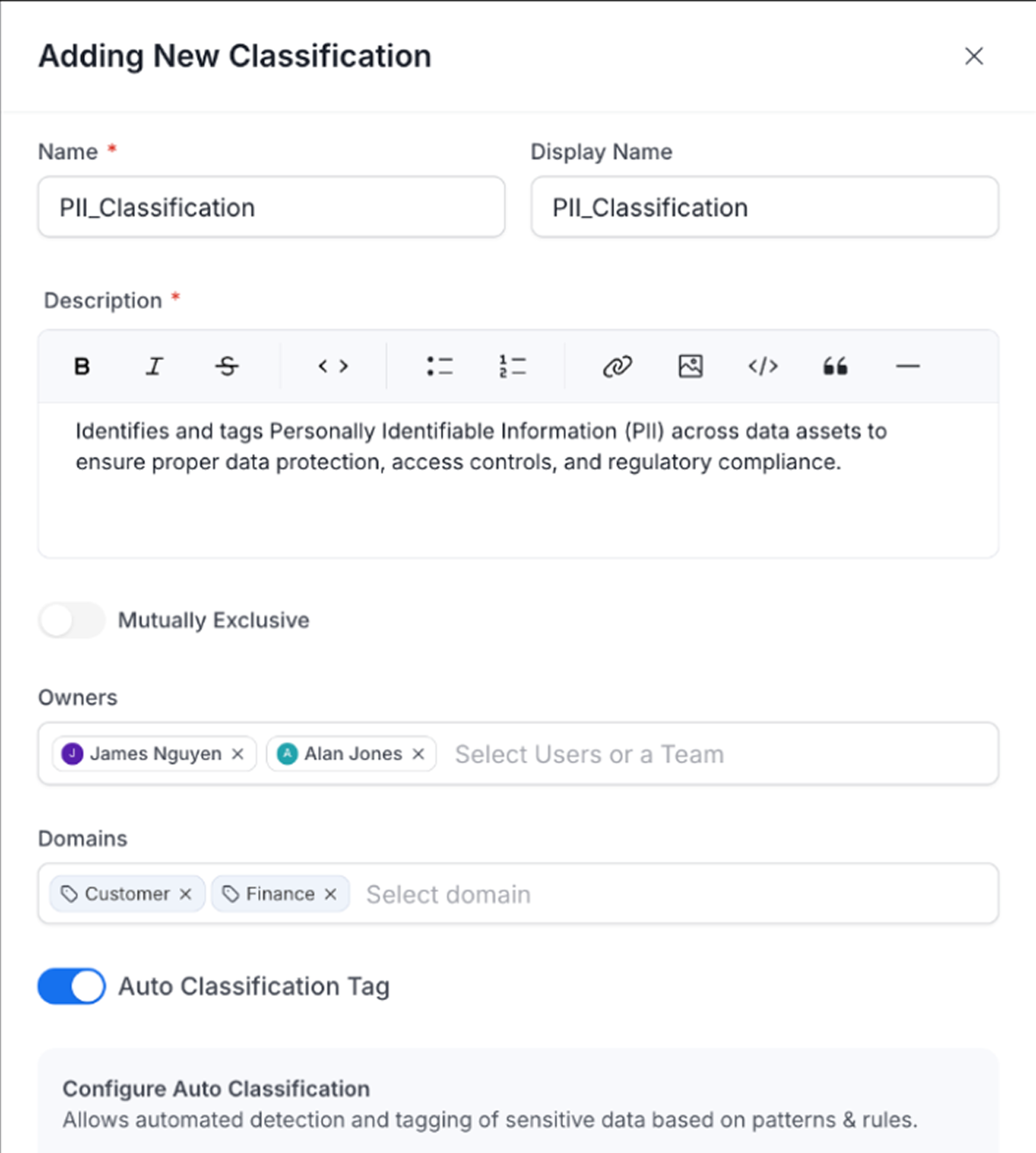
Auto Classification now lets you create custom AI-powered recognizers for any classification—not just PII—with a feedback loop that continuously improves accuracy. Organizations can teach Collate to identify company-specific data patterns using actual data content scanning, going far beyond the column-name-only approaches from other vendors.
-
Create custom recognizers: Define recognizers for any classification using regex patterns, column names, or data content. Configure confidence thresholds and language-specific rules to match your organization's unique data patterns.
-
False positive reporting: Users can report incorrectly applied tags with explanations, creating a feedback loop that improves the model. Next time auto classification runs, it considers these exceptions to avoid repeating mistakes.
-
Support for any data type: Extend beyond PII to classify business-critical data types specific to your organization—account numbers, product codes, customer segments, or any domain-specific patterns.
Why this matters: Every organization has unique data that standard classifiers miss—internal account formats, proprietary codes, or business-critical fields that don't fit generic categories. Custom recognizers let you teach Collate your organization's data language, automatically classifying thousands of columns with a feedback loop that improves accuracy over time.
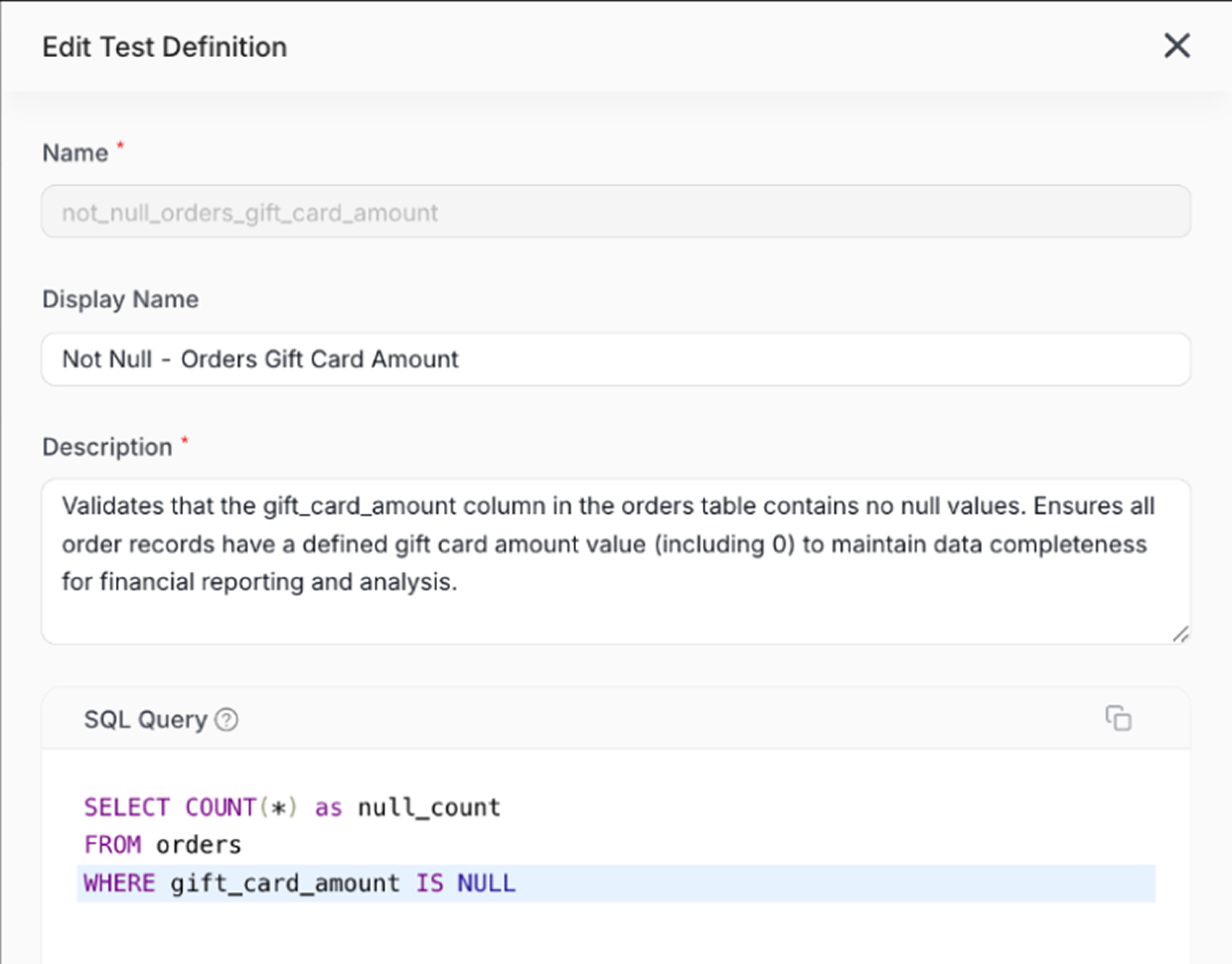
Data Quality Test Library
The Data Quality Test Library transforms how organizations standardize data quality testing. Administrators create reusable, parameterized test definitions through a GUI, eliminating the inconsistency and technical complexity of custom SQL tests scattered across the organization. This provides a superior alternative to dbt's generic tests while maintaining centralized governance.
-
Reusable test templates: Define SQL-based test templates with parameters that users fill in through a no-code interface. For example, create an "ARR validation" test once, then apply it consistently across 20 different tables without rewriting SQL.
-
UI-driven experience: Unlike dbt's YAML-based approach requiring technical knowledge, administrators define tests through a visual interface, and users apply them through simple forms—no code required.
-
Centralized governance: Admins control which tests are available organization-wide, disable irrelevant tests, and ensure everyone uses standardized definitions for critical business rules.
Why this matters: Organizations waste countless hours reinventing the same data quality tests with slight variations that undermine trust and consistency. The Test Library centralizes business logic into reusable templates, ensuring your rules mean the same thing across every table and transforming ad-hoc testing into standardized quality enforcement at scale.
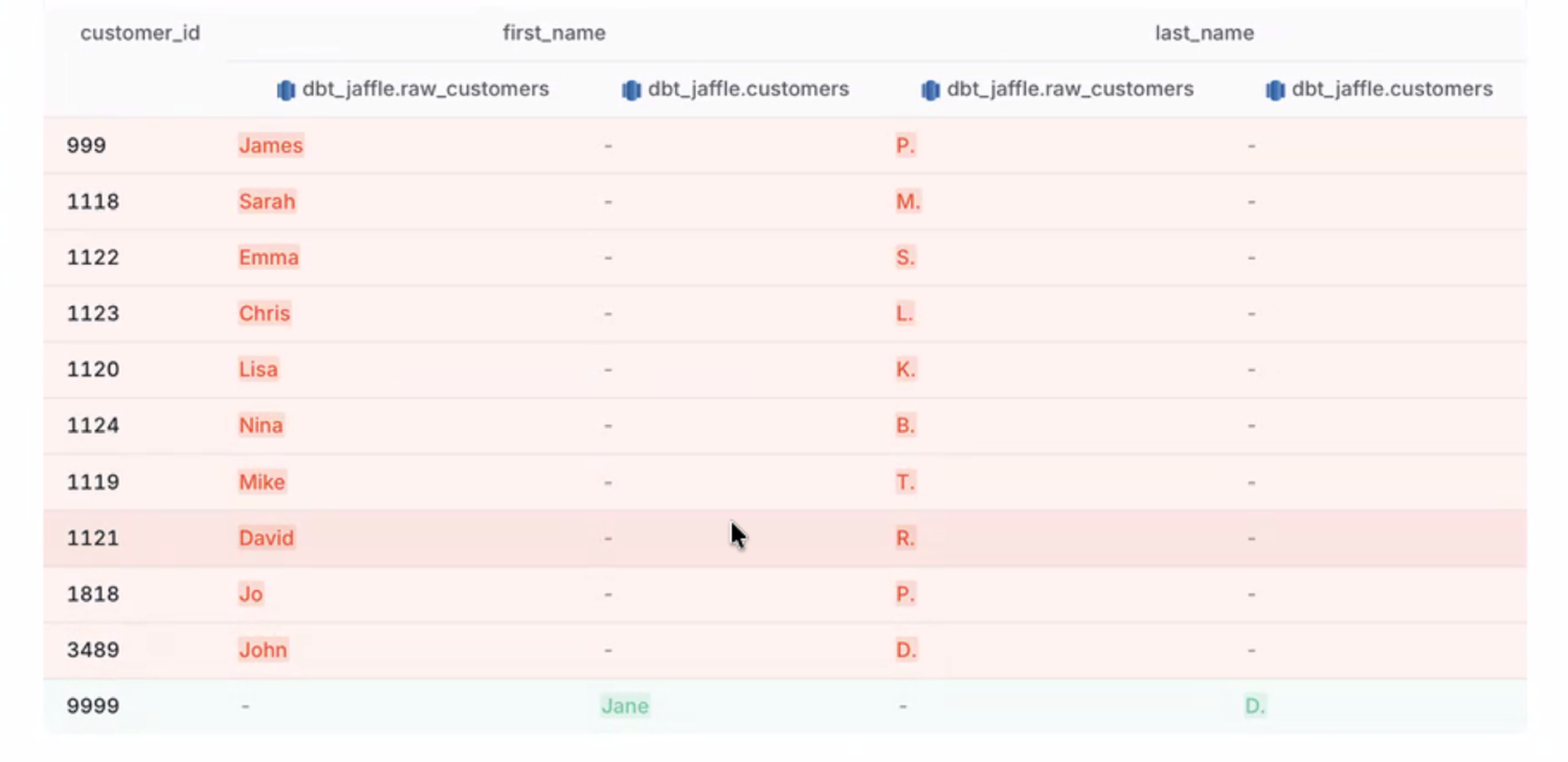
Data Diff Column/Row Analysis
Data Diff now provides granular visual comparison of differences between source and target tables at column, row, and character level. Quickly identify exactly what changed, where it changed, and by how much, accelerating troubleshooting and root cause analysis.
-
Column-level comparison: See which columns were added, removed, or modified between source and target, with clear visual indication of source-only and target-only columns.
-
Row-level analysis: Identify specific rows that differ, with detailed breakdowns showing which fields changed within each row.
-
Character-level precision: Drill down to see exactly which characters changed within a field—for example, seeing that a price changed from "$29" to "$24" with the specific characters highlighted.
Why this matters: When data quality tests fail, teams waste hours writing custom queries to pinpoint what changed. Data Diff automatically computes and visualizes exactly what's different at column, row, and character granularity, accelerating troubleshooting from hours to minutes.
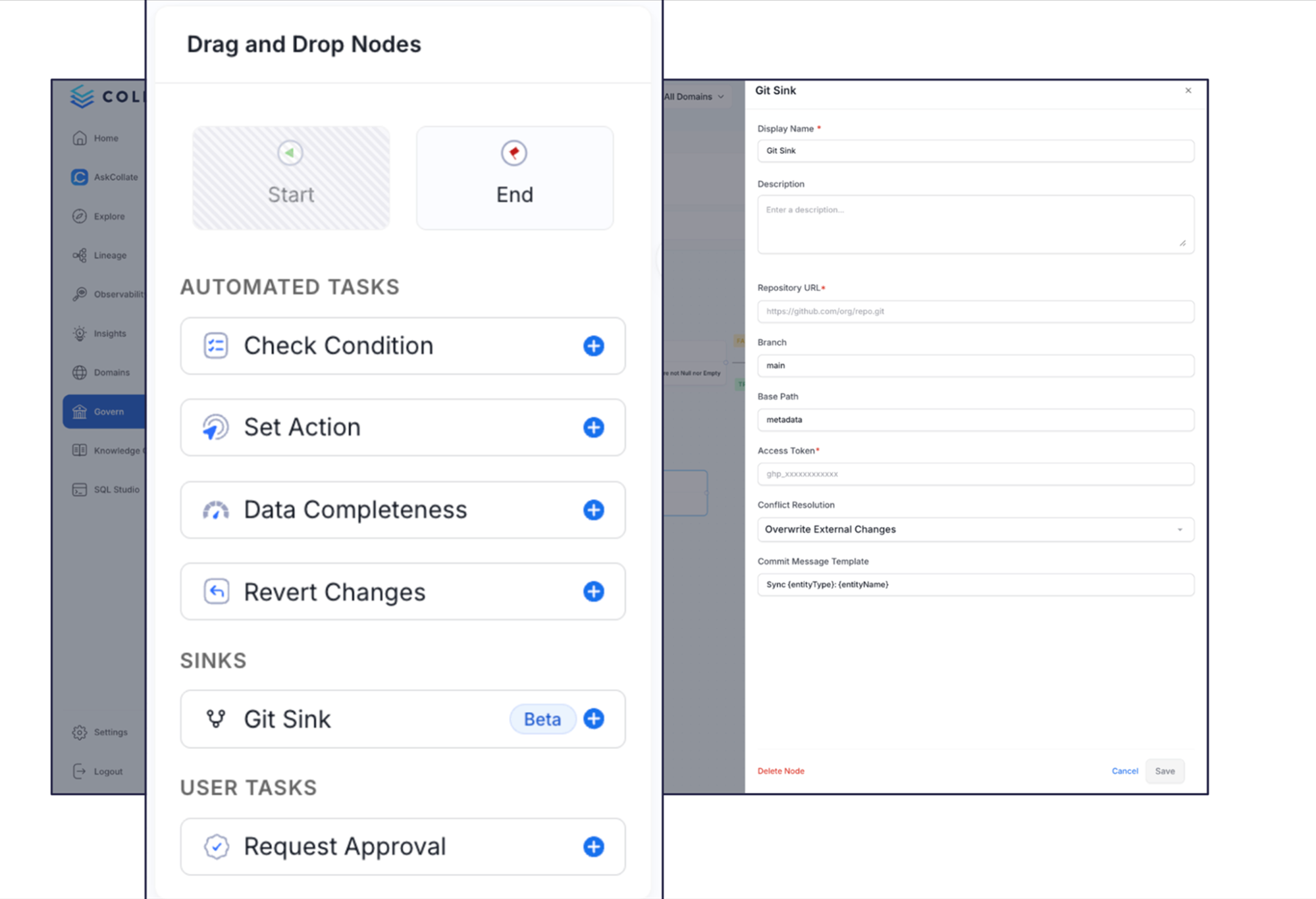
GitHub Metadata Sink (Beta)
GitHub Metadata Sink brings your metadata under version control, enabling code review, approval workflows, and CI/CD integration for metadata changes. Treat your data documentation, glossaries, and quality definitions with the same governance rigor as application code.
-
Automated Git commits: Send metadata changes to GitHub repositories automatically as they occur in Collate. Every description update, tag addition, or glossary term creates a versioned commit.
-
Code review and environment separation: Route metadata changes through GitHub pull requests for team review and approval before promoting to production. Work in a development Collate instance, merge through GitHub, and keep production safe from accidental modifications.
-
CI/CD integration: Trigger automated workflows when metadata changes—for example, automatically propagate approved schema changes to Snowflake or send notifications when critical tables are modified.
Why this matters: While teams enforce rigorous change management on SQL and Python, metadata changes happen in siloed UIs without review or rollback capabilities. GitHub Sink brings software engineering practices to metadata management, transforming metadata from an afterthought into a first-class citizen of your data platform.
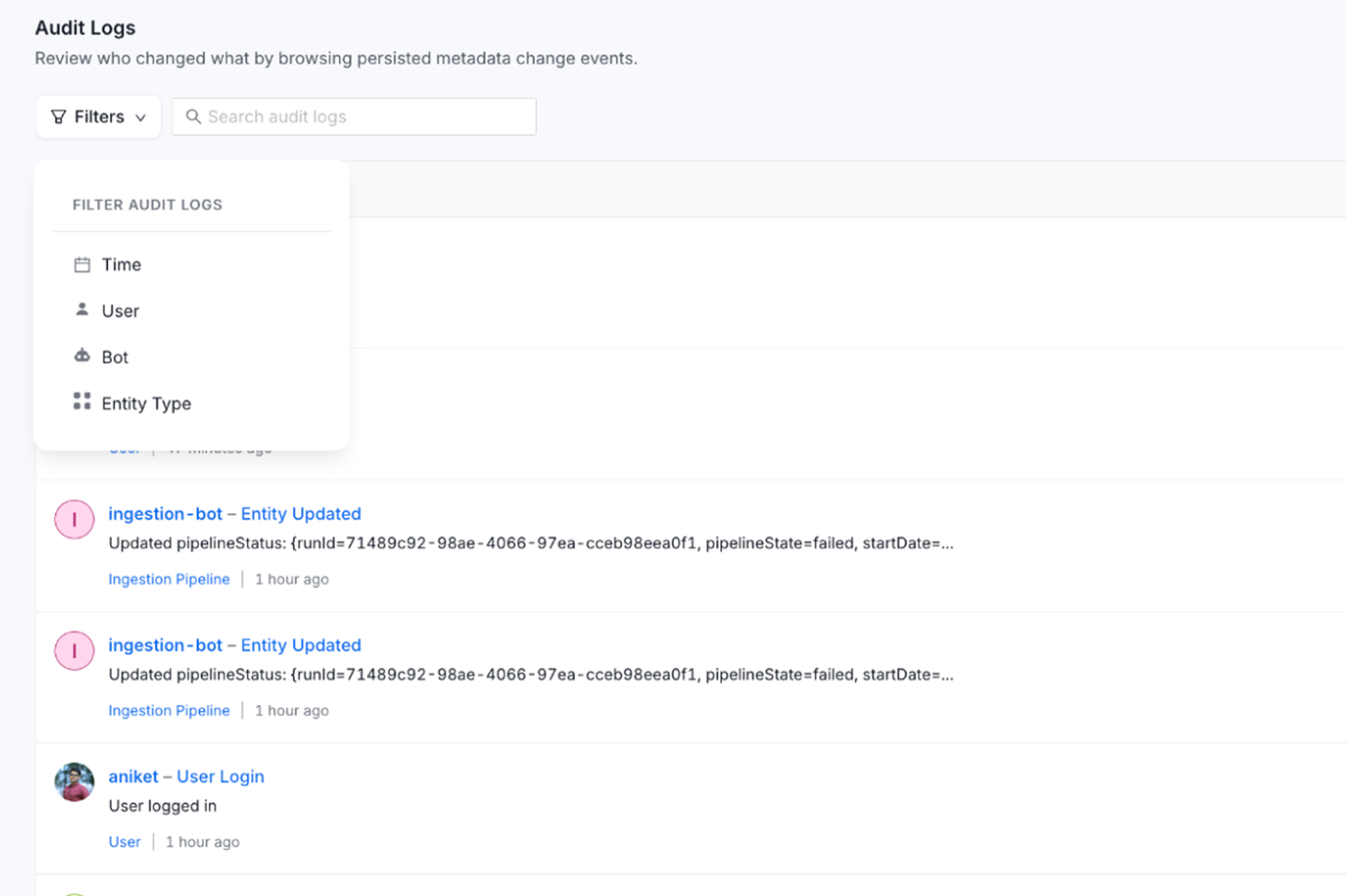
User & AI Audit Logs
Comprehensive audit logs now track all user and AI agent actions across the platform, providing full visibility into who changed what, when, and why. Export capability and filtering by user or AI agent enable governance oversight and troubleshooting.
-
Complete activity tracking: Every metadata change—whether by a human or an AI—creates an audit log entry showing the user, timestamp, affected entity, and the actual payload that changed.
-
AI agent accountability: Track exactly which AI agents took which actions, ensuring transparency as agents create documentation, modify tags, or generate test cases.
-
Filtering and export: Slice logs by user, agent, time range, or action type, then export results for compliance reporting, security audits, or offline analysis.
Why this matters: As AI agents increasingly make automated changes to metadata in partnership with human data teams, organizations need accountability and traceability. Audit logs provide the transparency enterprises require, letting you audit what agents and users have done.
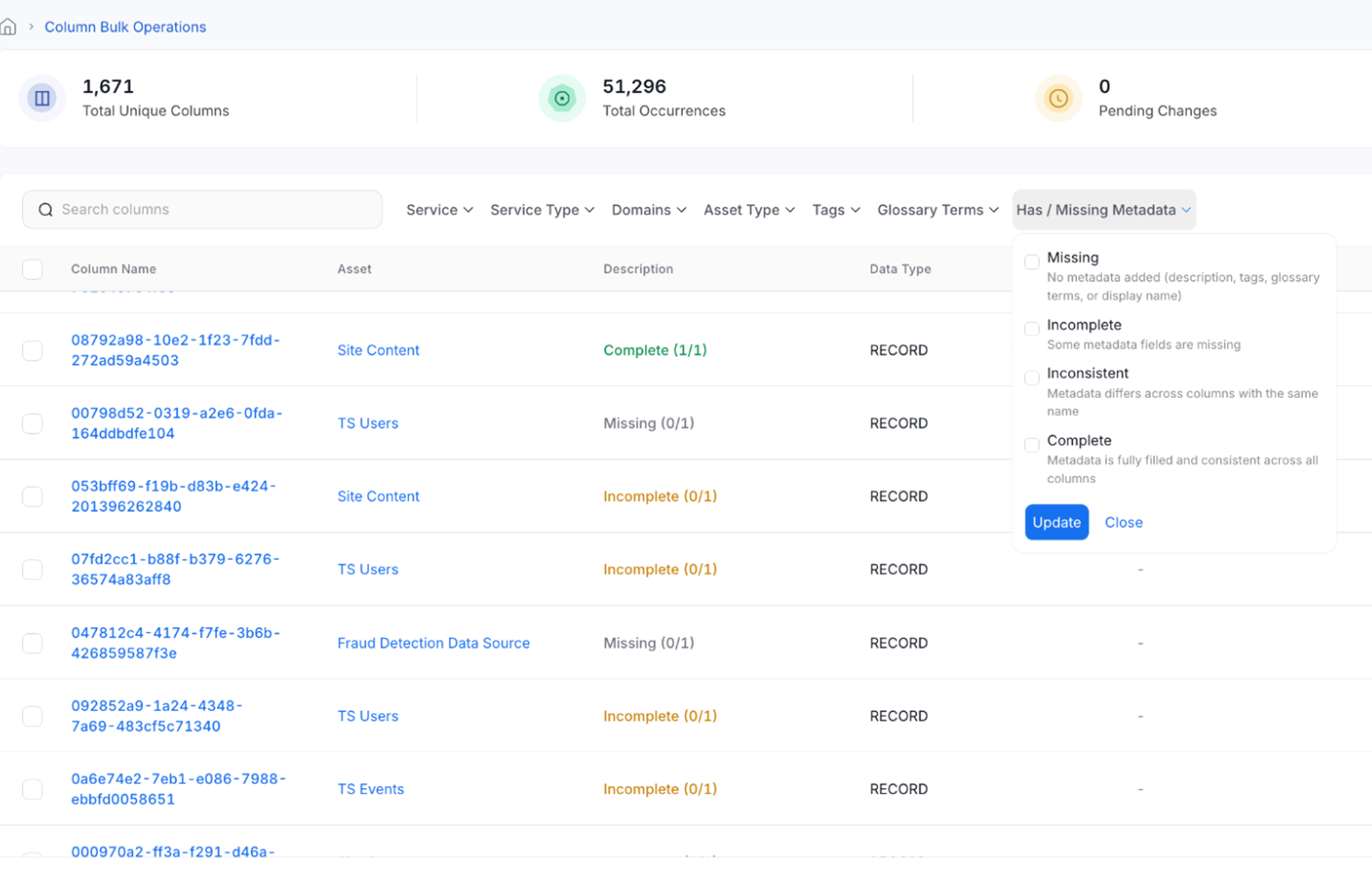
Column Bulk Operations
Column Bulk Operations aggregates identical column names across all asset types for unified governance at scale.
-
Cross-asset aggregation: Find all instances of a column name across tables, topics, containers, APIs, and search indexes in a single view
-
Bulk updates: Set descriptions, tags, and glossary terms for all instances simultaneously
-
Flexible filtering: Narrow operations by domain, tier, tags, or metadata status
Why this matters: When customer_id appears in 50 tables with inconsistent documentation, governance becomes impossible. Column Bulk Operations treats identical column names as a single entity you manage once, making enterprise-wide metadata consistency achievable.
Open Standards: ODCS 3.1 & OpenLineage Support
Collate 1.12 adds support for Open Data Contract Standard (ODCS) 3.1 for contracts and OpenLineage for lineage. Import existing contracts and export Collate contracts to standard formats. Ingest lineage from OpenLineage-compatible systems while maintaining Collate's broader lineage model.
-
ODCS 3.1 import/export: Import contracts defined in ODCS format or export Collate contracts to ODCS, enabling interoperability with other tools in the data contract ecosystem.
-
Richer semantics: Collate's contract specification extends ODCS with terms of service, metadata semantic rules, and ownership details that ODCS lacks, but remains compatible for organizations requiring this format.
-
OpenLineage API ingestion: Accept lineage metadata from Flink, Spark, Airflow, dbt, and other OpenLineage-compatible systems through native API integration.
Why this matters: Vendor lock-in and proprietary formats fragment the data ecosystem. Open standards enable interoperability, letting you use Collate alongside other tools and metadata investments while future-proofing your governance strategy.
AskCollate Enhancements
AskCollate continues evolving with expanded entity support, improved transparency, company context awareness, and automatic visualization generation.
-
Expanded entity support: AskCollate now works with metrics, knowledge center articles, and dashboard data models in addition to tables and dashboards.
-
Improved company context: AskCollate automatically fetches context from your glossary terms, metrics, and knowledge center when answering questions, ensuring responses align with your organization's definitions.
-
Enhanced thinking transparency: Expanded thinking steps show AskCollate's reasoning process in detail, building trust through visible logic.
-
Automatic chart generation: After executing queries, AskCollate automatically generates appropriate visualizations, streamlining analytics workflows.
-
MS Teams integration: Bring AskCollate into Microsoft Teams alongside the existing Slack integration.
New Connectors
Collate 1.12 adds support for six new connectors, expanding coverage across Microsoft Azure, data warehouses, messaging systems, and unstructured data.
-
Microsoft Fabric (beta): Connect to Microsoft's unified data platform, ingesting metadata from Data Warehouse, Power BI, and pipelines.
-
Dremio: Support for the lakehouse platform, enabling lineage and metadata ingestion from Dremio Cloud and Software editions.
-
Mulesoft: Integration with MuleSoft's Anypoint Platform for ingesting pipeline (application/flow) metadata, deployment status, and database lineage from MuleSoft applications.
-
SFTP: Connect to SFTP servers to catalog unstructured files alongside your structured data with this new drive integration.
-
Redshift Serverless: Native support for Amazon's serverless Redshift deployment option.
-
StarRocks: Support for the open-source analytical database, requested by dozens of community members.
Additional Enhancements
-
Learning Resources: Contextual tutorials and videos appear throughout the UI based on the current page, enabling self-service learning. Admins can customize resources to add organization-specific training materials.
-
Lineage Improvements: Column-only filtering, edge highlighting on hover, stored procedure support in edit mode, and significantly faster SQL parsing for complex lineages with thousands of nodes.
-
Explore Page Sidebar: Right-side navigation showing lineage, data quality details, and custom properties without leaving explore view, reducing clicks and accelerating discovery.
-
Metadata Exporter - Entity History: Export complete change tracking (who/what/when/payload) to data warehouses for custom dashboarding, running securely within customer networks.
-
Test Case Import/Export: Perform bulk operations on hundreds of data quality tests through import/export at table and multi-table levels.
-
Data Contracts at Data Product Level: Define contracts once at data product level with automatic inheritance to all assets, centralizing SLA, security, and semantic definitions.
-
Distributed Search Indexing: Multiple application servers share indexing workload for improved scalability with millions of assets.
-
Data Product Input/Output Ports: Support input/output port specifications with lineage visualization showing data flow into and out of data products.
-
Timezone-Aware Freshness Tests: Set specific timezones on freshness tests to match timezone-aware database data, preventing UTC misalignment issues.
-
SQL Studio - Postgres & Redshift Support: Adds Postgres and Redshift to existing Snowflake, Trino, and BigQuery support.
-
Snowflake Dynamic Table System Metrics: Support for INSERT, UPDATE, DELETE metrics in profiler for Snowflake dynamic tables.
-
Column Custom Properties: Side panel drawer interface for custom properties at column level with improved navigation.
Conclusion
Collate 1.12 represents a fundamental shift in how organizations govern and interact with their data. By giving you control over AI agents, standardizing data quality at scale, and treating metadata with the same rigor as code, this release empowers data teams to move from reactive firefighting to proactive governance. Whether you're customizing AI agents to meet organizational standards, creating company-specific data classifiers, or reviewing metadata changes through GitHub pull requests, Collate 1.12 provides the enterprise-grade capabilities that modern data teams need.
Ready to get started? Sign up for the Collate Free Tier of our managed OpenMetadata service, or Contact Sales to talk to a product specialist.